|
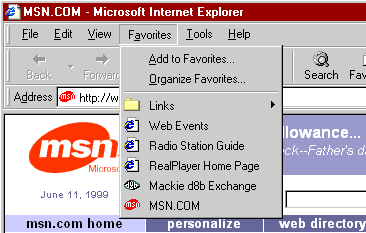
Shortcut icons in Microsoft® Internet Explorer
5 are a new feature that you can use to display your logo or some
other small graphic on the Favorites menu and Address bar. They
have no special Web server requirements and are a great way to add
brand recognition without requiring the user to download a custom
version of Internet Explorer 5. The following graphic displays a
shortcut icon for MSN.COM on the Internet Explorer 5 Favorites menu
and Address bar.
As usual Netscape will ignore this.
Create an icon 16x16 pixels using an icon editor.
One way is to save the icon with the default file name of favicon.ico
in the root directory of your domain—for example, www.microsoft.com/favicon.ico
Alternatively, there is an on-line Java package, located at http://www.favicon.com/
which allows you to create an icon specifically for this purpose.
You can also associate the icon with your Web page by saving the
icon with a file name other than favicon.ico.
This extension will add the required link entry.
To use this, click on the  icon in Objects window, select the icon and click OK.
|



 Download
for DW 3
Download
for DW 3 Download
for DW 4
Download
for DW 4
